

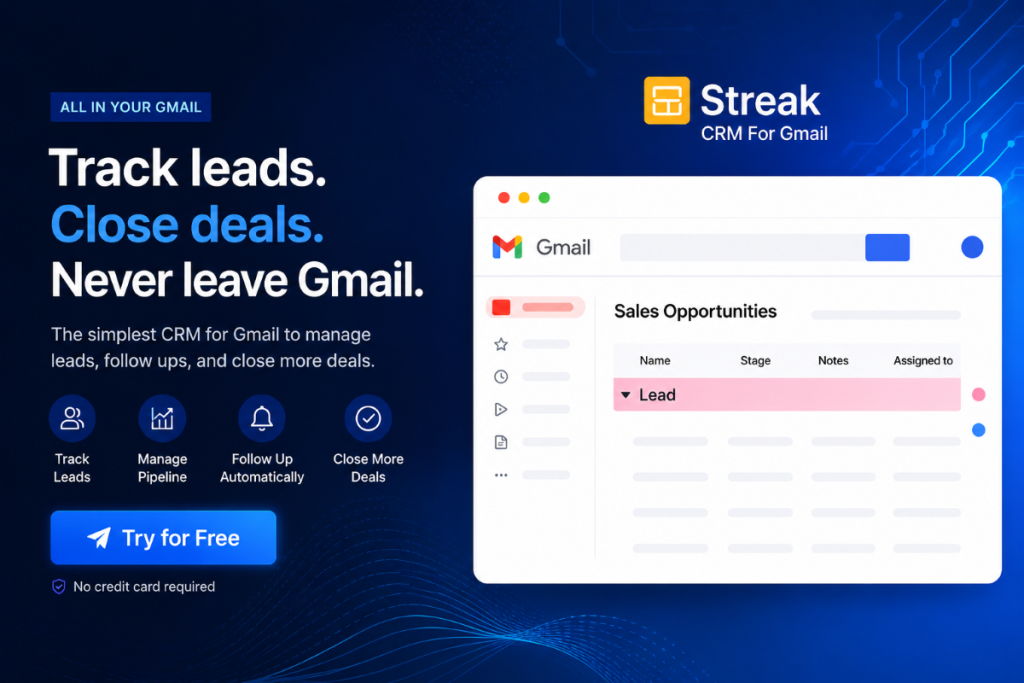
Streak CRM Review 2026: Most CRM tools have a problem nobody talks about openly.
This Streak CRM review 2026 covers everything you need to make that decision confidently.
You buy one, spend a week setting it up, drag your team into it, and then two months later, everyone has quietly gone back to managing deals in their inbox. The CRM sits there, half-filled with stale data, costing you money every month.
The reason is almost always the same: the CRM is somewhere other than where the actual work happens.
Streak solves that problem in the simplest way imaginable. It does not ask you to leave Gmail. It moves the CRM directly into Gmail pipeline views, deal tracking, email templates, follow-up reminders, contact records, and all and wraps it around the emails you are already sending.
No new tab. No separate login. No duplicate data entry. Just your inbox, upgraded.
This review covers everything you need to know before committing to features, real pricing, honest pros and cons, who it works best for, and who should walk away. We have spent time going through real user data across G2, Capterra, and Reddit to make sure this reflects what actual users experience, not just the sales page.

What Is Streak CRM?
This Streak CRM review 2026 starts with the basics. — Change to: Before we dive into this Streak CRM review 2026, here is the quick context.
Streak is a CRM built entirely inside Gmail as a Chrome browser extension. It has been around since 2012, which makes it one of the oldest Gmail-native CRM tools on the market, and it still holds a loyal following among freelancers, small sales teams, recruiters, real estate professionals, and anyone whose business lives and breathes through their inbox.
The core idea is elegant: instead of asking you to manage your relationships in a separate app, Streak embeds the CRM directly into your Gmail interface. Your pipeline sits next to your inbox. Every email thread can be turned into a trackable deal. Contact records pull automatically from your email history.
The result is a CRM that people actually use because it is impossible to forget about something that lives inside the app you open first thing every morning.
Streak holds a 4.5 out of 5 on both G2 (260+ reviews) and Capterra (479 reviews), consistently praised for its Gmail integration and pipeline visualisation.
→ Try Streak CRM Free — No Credit Card Required
Who Is Streak Built For? Streak CRM Review 2026
Before getting into features, let’s be direct about who gets the most out of Streak:
- Freelancers and solopreneurs who manage client relationships entirely through Gmail
- Small sales teams (2–15 people) that use Google Workspace as their primary business suite
- Recruiters tracking candidates through hiring stages
- Real estate agents managing leads, viewings, and offers over email
- Consultants and agencies tracking client projects and proposals
- Customer success teams are managing onboarding and support tickets via email
- Startup founders who need lightweight deal tracking without enterprise complexity
Streak is not the right tool if you:
- Use Outlook, Apple Mail, or anything other than Gmail. Streak simply does not work outside Google’s ecosystem
- Need deep marketing automation, advanced reporting, or full revenue forecasting
- Run a team of 20+ people with complex multi-department CRM needs
- Need native integrations with dozens of third-party tools without going through Zapier
This is not a knock on Streak; it is just honest positioning. The tool knows exactly what it is and who it is for.

Core Features: What Streak Actually Does
1. Pipelines: Your Deals, Inside Gmail
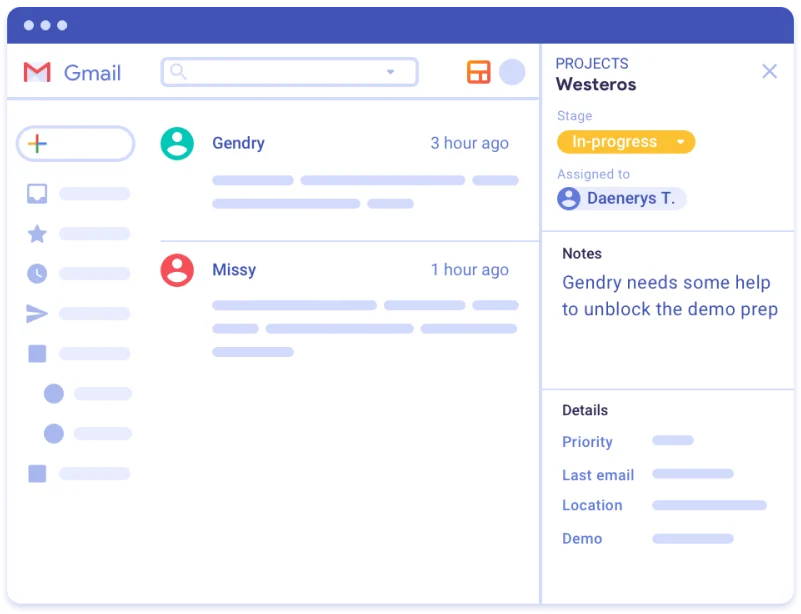
The centrepiece of Streak is its pipeline view. Think of it as a visual spreadsheet that lives inside Gmail. Each row is a deal, client, or project, and each column represents a stage in your workflow.
You create a pipeline (say, “New Leads”), define your stages (“Contacted,” “Proposal Sent,” “Negotiation,” “Closed Won”), and from that point forward, every relevant email thread gets attached to a row in your pipeline with one click.
The pipeline view is fast, visual, and customizable. You can add custom fields, deal value, close date, contact name, company, priority, and filter, sort, or search across all your deals in seconds.
What makes this genuinely powerful is the automatic email association. When you open an email from a contact in your pipeline, Streak shows you the full deal history in a sidebar panel: previous emails, notes, tasks, and deal stage without you doing anything extra.
2. Email Tracking: Know Exactly When Your Emails Get Read
Streak tracks every email you send and shows you when it was opened, how many times it was opened, and from what location. This information appears directly inside Gmail, with a small icon next to the email in your sent folder.
This is not a gimmick. Knowing that a client opened your proposal three times in one evening tells you something meaningful about their interest level. Knowing that an invoice email was never opened explains why the payment has not arrived. Real-time open notifications make follow-up instinctive rather than guesswork.
Email tracking is available on all plans, including the free tier.
3. Mail Merge Personalised Outreach at Scale
Streak’s mail merge feature lets you send personalised bulk emails directly from Gmail, so your messages don’t look like mass outreach. You pull contact data from your pipeline name, company, deal value, and any custom fields, and automatically merge it into your email template.
Each recipient gets a message that reads as if it were written individually for them, because from Gmail’s perspective, it was each email is sent as a separate message, not a group send.
The free plan allows 50 mail merge emails per day. The Solo plan goes up to 800 per day, and the Pro plan allows 1,500 per day, more than sufficient for most small business outreach.
4. Email Snippets Templates That Save Hours Every Week
Snippets are saved email templates that you can insert into any email with a keyboard shortcut. If you find yourself writing the same types of emails repeatedly, follow-ups, introductions, proposals, and meeting requests, you can save them once as snippets and insert them in seconds.
This is one of those features that sounds small but saves a surprising amount of time once you start using it daily.
5. AI Co-Pilot Streak’s New AI Layer
Streak added an AI Co-Pilot in 2025 that has become genuinely useful in 2026. It includes four core AI capabilities:
AI Deal Summaries: Summarises an entire email thread and deal history into a short, brief, useful summary when you need to catch up on a prospect you have not spoken to in weeks.
AI Autofill: Scans emails and automatically suggests updates for pipeline fields, contact details from email signatures, company names, and deal values mentioned in emails.
AI Q&A: Ask natural language questions about your deals, “What did this client say about pricing?” or “When did we last speak?” and get answers pulled from your email history.
AI Action Steps: Four automation triggers- AI Response, AI Autofill, Ask AI, and Generate Summary — that can be set up to run automatically under specific conditions.
The honest caveat on AI credits: Pro users get 10 AI credits per month. That is roughly 10 deal summaries or autofill actions. Pro+ gets 50, and Enterprise gets 500. For light use, Pro is enough. But heavy AI users will burn through credits quickly, and additional credit packs cost $50–$400 per month, a significant add-on cost that deserves attention before upgrading.
6. Shared Pipelines Team Collaboration
On the Pro plan and above, pipelines can be shared across your team. Every team member sees the same deals, can add notes, assign tasks, update stages, and track the same emails, all within their own Gmail inboxes.
This is what makes Streak genuinely useful for small sales teams. There is no separate “team view” or admin dashboard to log into. Everyone works from their inbox; the pipeline stays synchronised automatically.
7. Workflow Automation
On higher plans, Streak offers basic automation, triggering actions when a deal moves between stages, sending automatic follow-up reminders, updating fields based on email events, and integrating with Zapier for connections to outside tools.
The automation is not as deep as HubSpot or Salesforce, but for a team running primarily through Gmail, it handles the most common repetitive tasks well.
8. Mobile App
Streak has a mobile app for both iOS and Android, which means you can check and update your pipeline while away from your desk. The mobile experience is solid for viewing and updating deals, not as full-featured as the desktop extension, but functional for on-the-go CRM management.
Streak CRM Review 2026 — Full Pricing Breakdown
Here is the complete, verified pricing as of June 2026:
| Plan | Monthly Price | Annual Price | Best For |
|---|---|---|---|
| Free | $0 | $0 | Individual use, email tracking only |
| Solo | $19/user/mo | $15/user/mo | Solopreneurs needing a basic pipeline |
| Pro | $59/user/mo | $49/user/mo | Small teams, shared pipelines |
| Pro+ | $89/user/mo | $69/user/mo | Advanced reports, automations |
| Enterprise | $159/user/mo | $129/user/mo | Large teams, security, SSO |
What Each Plan Actually Includes
Free Plan:
- Email open tracking
- Email snippets (templates)
- Mail merge (50 emails/day)
- Thread splitting
- No pipeline CRM access
- Single user only
Solo Plan ($15/user/mo annually):
- Everything in Free
- Basic CRM pipeline access (5,000 boxes/deals)
- Mail merge up to 800/day
- Link tracking
- No shared pipelines (personal use only)
Pro Plan ($49/user/mo annually):
- Everything in Solo
- Unlimited CRM pipelines and boxes
- Shared team pipelines
- Mail merge up to 1,500/day
- Advanced pipeline features (formulas, custom fields, saved views)
- Reporting and dashboards
- Zapier integration and API access
- 10 AI credits/user/month
Pro+ Plan ($69/user/mo annually):
- Everything in Pro
- Advanced reports and analytics
- Automations
- Archived users
- 50 AI credits/user/month
Enterprise Plan ($129/user/mo annually):
- Everything in Pro+
- Custom permissions and roles
- Data validation rules
- SAML single sign-on
- Priority support
- Advanced security features
- 500 AI credits/user/month
The Pricing Reality Check
There is an important pricing change that Streak made in recent years that most review sites gloss over: the free plan no longer includes CRM pipelines.
The free tier now covers email tracking, snippets, and 50 mail merges per day, useful tools, but not a full CRM. Actual deal and pipeline management now requires at a minimum the Solo plan at $15/user/month.
For a single user, $15/month is reasonable. But for a small team of five on the Pro plan, you are looking at $245/month (or $2,940/year on the annual plan). That is a meaningful budget decision for a small business, and one worth factoring in carefully before committing.
For comparison: Pipedrive starts at $14/user/month, and Copper (another Gmail CRM) starts at $29/user/month. Streak sits comfortably in the mid-range.
→ Start Your Free Streak Trial Here
The Real Pros of Streak CRM
1. Zero Learning Curve: Install the Chrome extension, connect your Gmail, and you’re running a CRM in under ten minutes. There is no onboarding flow to sit through, no data migration wizard, no settings labyrinth. Most users are productive within an hour of installation. Compared to HubSpot’s onboarding, Salesforce’s admin overhead, or even Copper’s setup process, Streak is in a different league for time-to-value.
2. Genuinely Lives Inside Gmail This is not a “Gmail integration” in the sense of syncing data across two apps. Streak does not have a second app. The CRM is Gmail. You never leave your inbox to check your pipeline, update a deal, log a note, or review a contact’s history. For anyone who already lives in Gmail, this removes the single biggest reason CRM adoption fails.
3. Email Tracking That Actually Informs Your Sales Process. Real-time open notifications are genuinely actionable. When a proposal you sent gets opened three times in one afternoon, that is your cue to follow up. When an email sits unread for five days, that tells you something, too. Having this data automatically, without any extra effort, changes how you approach follow-ups.
4. Versatile Beyond Just Sales Most CRM tools are built for sales pipelines and struggle with anything else. Streak works just as well for recruiting pipelines, client project management, fundraising outreach, real estate deal tracking, and customer support workflows. You build the pipeline to match your process — not the other way around.
5. Google Workspace Native If your business runs on Google Workspace, Streak integrates seamlessly with Google Drive files attached directly to deals, Google Calendar events link to pipeline contacts, and Google Meet calls are logged automatically. There is no friction because everything is already inside the same ecosystem.
6. Solid Free Tier for Testing. The free plan is genuinely enough to test whether Streak fits your workflow before committing to a paid plan. Email tracking and snippets alone are valuable, and the pipeline features become available on a free trial of the paid tier.
Most CRMs get abandoned within 60 days. This Streak CRM review 2026 shows you why Streak is different — and when it isn’t.
The Real Cons of Streak CRM — The Honest Version
1. Gmail-Only — Full Stop. If even one person on your team uses Outlook, Microsoft Teams, or any non-Gmail email client, Streak does not work for your whole team. There is no web app, no desktop app, no Outlook integration. This is the single biggest dealbreaker for teams that are not fully committed to Google Workspace.
2. Performance Slows Down as Your Data Grows. Multiple reviewers on G2 and Capterra report noticeable lag in Gmail once a pipeline grows past a few hundred deals. For high-volume teams processing large deal volumes, this performance degradation adds up throughout the workday. Streak is optimised for small-to-medium pipelines; it starts to strain under enterprise volume.
3. The $0 to $49 Jump Is Steep. The gap between the free plan (email tracking only) and the Pro plan (team CRM) is jarring. There is a Solo plan at $15/month that bridges it somewhat, but teams wanting shared pipelines, the feature most small businesses actually need, jump straight to $49/user/month. For a three-person team, that is $147/month for what many competitors offer for cheaper.
4. Customer Support Is Consistently the Lowest-Rated Aspect Across every review platform, G2, Capterra, and GetApp, customer support scores consistently below the rest of Streak’s ratings. Users report slow response times and limited help for non-technical issues. For a paid product at $49/user/month, this is a legitimate concern.
5. AI Credits Run Out Fast on Lower Plans. Ten AI credits per month on the Pro plan is not very much. For teams that want to use AI deal summaries and autofill regularly, the credit limit forces either rationing or significant extra spend on credit packs. The AI features are genuinely useful — the credit structure just does not match how teams naturally want to use them.
6. Limited Channels Email Only The honest question for any CRM in 2026 is whether email is still where enough of the work happens to justify a fully email-native tool. Professional relationships increasingly span LinkedIn, WhatsApp, phone calls, and in-person meetings. Streak has no answer for any of those channels. If your sales process extends meaningfully beyond email, you will feel that gap.
7. Scaling Ceiling Around 10–15 Users. Streak is built and optimised for small teams. Once you move past 10–15 users, the lack of enterprise features, advanced role management, deep reporting, complex automation, and dedicated account management starts to show. Fast-growing teams often migrate away from Streak as they scale.
Before you install anything, read this Streak CRM review 2026 — it could save you months of wasted time.
Streak vs The Alternatives
| Streak | Copper CRM | HubSpot CRM | Pipedrive | |
|---|---|---|---|---|
| Gmail Native | ✅ Fully | ✅ Fully | ❌ Integration only | ❌ Integration only |
| Free Plan | ✅ (limited) | ❌ Trial only | ✅ Generous | ❌ Trial only |
| Starting Paid Price | $15/user/mo | $29/user/mo | $15/user/mo | $14/user/mo |
| Best For | Gmail-first small teams | Gmail teams want more depth | All business sizes | Sales-focused teams |
| AI Features | ✅ Co-Pilot (limited credits) | ✅ Limited | ✅ Strong | ✅ Growing |
| Mobile App | ✅ | ✅ | ✅ | ✅ |
| Ease of Setup | ⭐⭐⭐⭐⭐ | ⭐⭐⭐⭐ | ⭐⭐⭐ | ⭐⭐⭐⭐ |
Choose Streak over Copper if you want faster setup and a free starting tier. Choose Copper over Streak if your team needs deeper CRM features and you are willing to pay more from day one.
Choose Streak over HubSpot if your team is small, Gmail-native, and does not need marketing automation or deep reporting. Choose HubSpot if you want a CRM that scales to enterprise and includes marketing tools.
Choose Streak over Pipedrive if your entire workflow lives inside Gmail. Choose Pipedrive if you need a more powerful standalone sales CRM with stronger pipeline analytics.

Real Use Cases — How Different Businesses Use Streak
Freelancer managing client projects: Set up a “Client Projects” pipeline with stages: Proposal, Contract Sent, In Progress, Review, Invoiced, Paid. Every email from a client is attached to their row. Notes, files, and task reminders sit alongside the email thread. No juggling between a project tool and your inbox.
Small sales team of 4 people: Shared pipeline for inbound leads, everyone sees every deal, can claim ownership, update stages, and leave notes. Email open tracking shows who is engaged. Mail merge handles initial outreach at scale. Daily standup is replaced by a quick pipeline review inside Gmail.
Recruiter managing hiring: Candidates move through stages: Applied, Phone Screen, Interview, Offer, Hired. Every email exchange attaches automatically. Custom fields track interview scores, salary expectations, and start dates. Follow-up reminders ensure no candidate falls through the cracks.
Real estate agent: Property listings as pipelines. Buyer leads tracked from first inquiry to offer to close. Email open tracking shows who is actively considering a property. Mail merge sends personalised property updates to interested buyers. All from inside Gmail.
Our Streak CRM Review 2026 Verdict — FutureToolLab Score
| Category | Score |
|---|---|
| Ease of Setup | ⭐⭐⭐⭐⭐ 5/5 |
| Gmail Integration | ⭐⭐⭐⭐⭐ 5/5 |
| Core CRM Features | ⭐⭐⭐⭐ 4/5 |
| AI Features | ⭐⭐⭐ 3/5 |
| Pricing Value | ⭐⭐⭐ 3.5/5 |
| Customer Support | ⭐⭐⭐ 3/5 |
| Scalability | ⭐⭐⭐ 3/5 |
| Overall | ⭐⭐⭐⭐ 4/5 |
Is Streak CRM Worth It in 2026?
Yes — if you fit the profile it is built for.
If you run a small business, work as a freelancer, manage a small sales team, recruit candidates, or handle client relationships, and you do all of this primarily through Gmail, Streak is one of the most frictionless, immediately useful tools you will find. The setup takes minutes. The learning curve is almost nonexistent. The pipeline visibility transforms how you manage relationships without asking you to change a single habit.
No, if you don’t.
If your team uses Outlook, if you need deep marketing automation, if you are managing a pipeline of hundreds of active deals across a large team, or if you need a CRM that extends meaningfully beyond email, Streak will feel limiting fast. There are better tools for those needs.
The Solo plan at $15/month is a genuinely fair price for a single user. The Pro plan at $49/user/month is on the steeper side for small teams worth it if email is truly the centre of your workflow, harder to justify if it is only part of it.
Our recommendation: start with the free tier, test it with your real pipeline for two weeks, and upgrade only when you feel the limits.
→ Try Streak CRM Free — Set It Up in 10 Minutes
What do users say in every Streak CRM review 2026 about the free plan?
Is Streak CRM free? Streak has a free plan that includes email tracking, snippets, and 50 mail merges per day. CRM pipeline features require the Solo plan ($15/user/month) or above. The free tier is useful for testing, but not a full CRM experience.
Does Streak work on mobile? Yes. Streak has iOS and Android apps that let you view and update your pipeline on the go. The mobile experience is functional but less full-featured than the desktop Chrome extension.
Is Streak safe? Does it read my emails? Streak accesses your Gmail to power its CRM features email tracking, pipeline association, and contact records. It is Google-verified and listed in the Google Workspace Marketplace. Its privacy policy covers what data is stored. If you are handling highly sensitive data, review the privacy policy directly before installing.
Can my whole team use Streak? Yes, on the Pro plan and above. Shared pipelines allow your entire team to see and update the same deals from their own Gmail inboxes. The free and Solo plans are for personal use only.
What happens if I stop using Streak? Your emails remain in Gmail. Streak data pipelines, notes, and custom fields can be exported as CSV. You do not lose your email history; only the CRM layer disappears.
Does Streak integrate with other tools? Streak integrates natively with Google Workspace tools. For connections to outside tools like Slack, Trello, or Salesforce, you use Zapier or the Streak API (available on Pro and above).
To wrap up this Streak CRM review 2026, Streak is the answer to a very specific and very real problem.
Streak is the answer to a very specific and very real problem: CRM tools that nobody actually uses because they live outside the inbox, where work happens.
For the right person, a freelancer, a small sales team, a recruiter, a consultant, anyone who runs their professional life through Gmail — Streak removes every reason to avoid a CRM. It is already where you are. It takes ten minutes to set up. It works the first time you use it.
That is rarer than it sounds.
→ Get Started with Streak CRM Free Today
Explore more in-depth software reviews, AI tool guides, and the best deals at FutureToolLab.com
Related Articles on FutureToolLab:
- 10 Best Business Tools in 2026 That Actually Save You Time
- Best Free AI Tools for Small Business Owners in 2026
- Best CRM Software for Small Business in 2026
- Notion vs Asana vs Trello — Which Is Best for Your Team? (Coming Soon)


2 thoughts on “Streak CRM Review 2026: Ultimate Honest Gmail CRM Review”