

You’ve been using Calendly’s free plan for a while now. It’s worked fine.
But lately, you’ve hit one of those walls. Maybe you need a second event type.
Maybe you want to remove the Calendly branding. Maybe a client asked for a feature that’s locked behind the paid tier.
Now you’re staring at the upgrade button, and a question pops into your head: Is this worth $10-16 a month, forever? Or is there a better way to handle this?
That’s exactly where TidyCal comes in, and it’s the heart of this TidyCal vs Calendly comparison.
We’ll walk through what actually changes if you upgrade Calendly, what TidyCal offers instead, and which option makes more sense depending on where your business is right now.
The Quick Answer
If you’re a solopreneur, freelancer, or small business owner who just needs a clean booking page, calendar sync, and the ability to take payments, TidyCal’s one-time lifetime payment will almost certainly save you money over upgrading Calendly.
If you’re part of a larger team that needs deep CRM integrations, advanced routing, or enterprise-level workflow automation, Calendly’s paid tiers are built for that, and the subscription cost reflects real, team-scale functionality.
Here’s the quick side-by-side before we go deeper.
Why This TidyCal vs Calendly Decision Point Matters
Calendly’s free plan is genuinely useful. That’s exactly why so many people start there.
But free plans are designed to get you hooked, then nudge you toward the paid tiers once you’re relying on the tool daily.
One event type. Calendly branding on every booking page. No way to remove it without paying.
For most solo users, the jump from free to Calendly Standard ($10/month) or Teams ($16/month per seat) feels small in the moment. A coffee a month, right?
The problem is that it’s not a one-time coffee. It’s every month, for as long as you use the tool. Over a year, that’s $120 to $192. Over five years, $600 to nearly $1,000, just for one person.
And here’s the part that catches a lot of people off guard. Once your booking link is shared everywhere, on your website, your email signature, your social bios, switching tools later feels like a hassle.
So people stay. They upgrade. The subscription becomes part of the monthly overhead, quietly, without much thought.
That’s not necessarily a mistake. But it’s worth pausing on, especially if your actual usage hasn’t changed much since you were on the free plan.
If you’re still just sending one type of booking link, syncing one calendar, and occasionally taking a payment, the question becomes: are you paying $10-16 a month for features you’re not using, or for features you genuinely need?
This is exactly the gap TidyCal was designed to fill.
5 years: $600
TidyCal lifetime: $29 once
What TidyCal Actually Offers
Anyone weighing TidyCal vs Calendly should start here, with what TidyCal actually puts on the table.
TidyCal was built specifically as an answer to this exact frustration.
It’s a scheduling tool that does the core job, booking pages, calendar sync, payment collection, reminders, without the recurring bill.
Core Scheduling Features
TidyCal lets you create a personalized booking page with your photo, branding, and a short bio. Visitors pick a time that works for them, and it syncs straight to your calendar.
You can set up multiple booking types (a 15-minute call, a 60-minute consultation, a discovery session) and connect Google, Microsoft, or Apple calendars.
Your link follows a clean format like tidycal.com/yourname/meeting-type, easy to remember, easy to share, and easy to drop into an email signature or social bio.
Buffer times, availability windows, and timezone detection all work the way you’d expect from a modern scheduling tool. None of this feels stripped down or “lite.”
Getting Paid
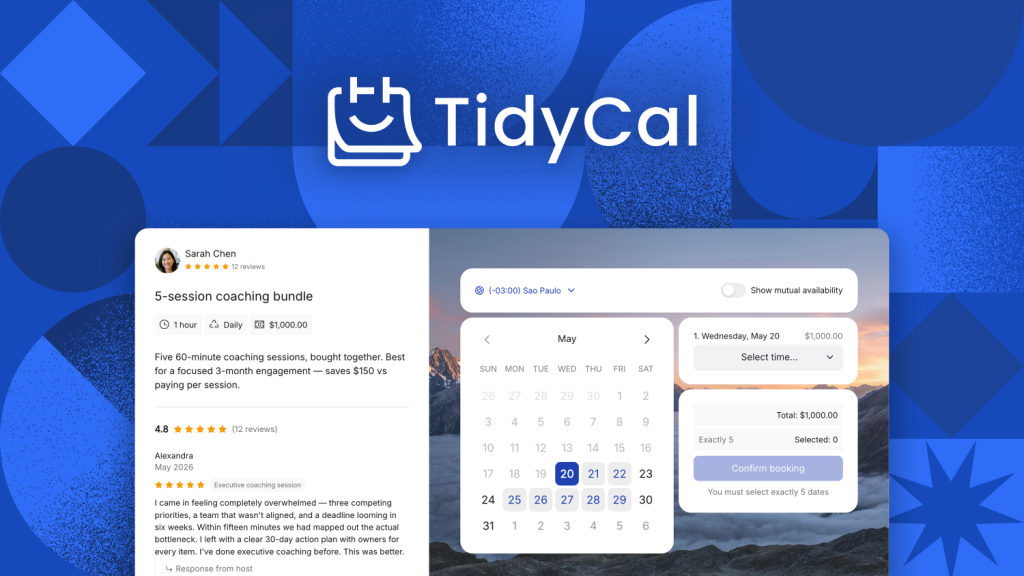
This is where TidyCal quietly punches above its weight. You can connect Stripe or PayPal and charge for bookings directly, no separate invoicing tool needed for simple paid sessions.
For coaches, consultants, and service providers who charge per session, this turns the booking page into a small storefront. Someone books, pays, and it’s done, without a separate invoice going back and forth.
Recurring packages are supported too, so if you sell a “pack of 5 sessions” or similar, TidyCal can handle that without extra plugins.
Reminders and Notifications
Automated email reminders go out to reduce no-shows, and on the Agency tier, SMS reminders are available for US and Canadian numbers.
This may sound small, but for anyone running client calls regularly, fewer no-shows directly means fewer wasted hours.
Team Features (Agency Tier)
If you run a small team or agency, the Agency Lifetime tier adds round-robin scheduling, collective meetings, and SMS reminders for US and Canada numbers, the same feature set Calendly reserves for its paid team plans.
Round-robin scheduling means incoming bookings are automatically distributed across your team, which is useful for sales teams or agencies where any available team member can take a call.
Collective meetings let multiple team members be booked into the same slot, handy for panel interviews or joint consultations.
What Calendly Offers That TidyCal Doesn’t
No fair TidyCal vs Calendly comparison would skip this part, so let’s give Calendly its due.
TidyCal isn’t trying to be Calendly, and it shows in a few areas.
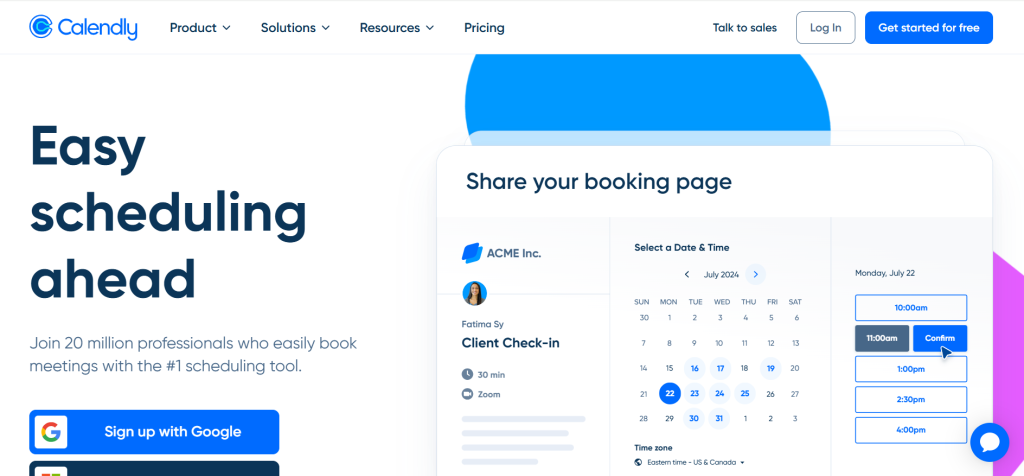
Calendly has over 150 native integrations, including deep CRM connections like Salesforce. If your sales team lives inside a CRM and needs scheduling to flow directly into it, that’s a real advantage.
Calendly also has a polished native mobile app, AI meeting notetaking, advanced workflow automation, and meeting analytics. These are genuinely useful for teams managing high volumes of external meetings.
The AI notetaker, in particular, has become one of Calendly’s standout features. It can join calls, take notes, and summarize key points automatically, saving time for anyone running back-to-back client meetings.
Meeting analytics give managers visibility into how scheduling is actually being used across a team: which links get the most bookings, where drop-off happens, and how meeting load is distributed.
Workflow automation lets you trigger follow-up emails, reminders, or internal notifications based on booking events, without needing a separate automation tool like Zapier layered on top.
If your business already depends on these features, replacing Calendly with TidyCal would mean losing functionality your team relies on daily. That’s not a small switching cost.
- 150+ integrations, incl. Salesforce
- AI meeting notetaker
- Meeting analytics dashboard
- Native mobile app
TidyCal vs Calendly: Real Pricing Breakdown
This is usually the section people scroll straight to when comparing TidyCal vs Calendly, so let’s get into it.
Numbers make this easier than feature lists. Here’s what each option actually costs.
TidyCal Individual Lifetime is a one-time payment of $29. No renewals, ever.
TidyCal Agency Lifetime is a one-time payment of $79 and includes everything in Individual, plus team scheduling features.
Calendly Standard is $10 per seat, per month, billed monthly or annually.
Calendly Teams is $16 per seat, per month, for advanced team routing and admin controls.
For a single freelancer comparing TidyCal’s $29 lifetime deal against Calendly Standard, the lifetime deal pays for itself in under three months. After that, every month is pure savings.
For a 5-person team, TidyCal Agency Lifetime at $79 one-time compares to roughly $600 per year on Calendly Standard, or $960 per year on Calendly Teams.
That’s not a one-year saving either. Run that comparison out three or five years, and the gap between a single $79 payment and an ongoing $600-$960 annual bill becomes hard to ignore.
It’s worth being clear that this isn’t “TidyCal is free, and Calendly is expensive.” Both have real value.
The question is simply whether the extra cost of Calendly’s subscription model is buying your specific team something it actually uses.
For a solo freelancer sending one type of booking link, the honest answer is usually no. For a sales team running CRM-integrated workflows across ten reps, the answer is often yes.
Following the TidyCal vs Calendly review?
Who Should Upgrade Calendly Instead of Switching
Not everyone reading this TidyCal vs Calendly breakdown should switch, and that’s worth saying clearly.
There are real situations where staying on Calendly and paying for the upgrade makes sense.
If your team already has workflows, integrations, and routing rules built into Calendly, migrating away means rebuilding all of that. That’s hours of work and a learning curve for your team.
If you specifically need Salesforce or HubSpot-level CRM integration, TidyCal doesn’t currently match that depth. Calendly’s paid tier is the right tool for that job.
And if you’re part of a larger organization where the scheduling tool is just one piece of a bigger tech stack decision, switching a single tool in isolation may not be worth the friction.
Who Should Switch to TidyCal
For a lot of people running the TidyCal vs Calendly comparison, this is the section that settles it.
On the other hand, if you’re a solopreneur, coach, consultant, freelancer, or small agency, and your scheduling needs are genuinely simple, a booking page, calendar sync, and the ability to collect payment, TidyCal can completely cover it.
The lifetime pricing model also removes a recurring decision. You’re not re-evaluating “is this subscription still worth it” every renewal cycle. You pay once, and it’s handled.
For agencies specifically, the Agency Lifetime tier at $79 gives you the team features (round-robin, collective meetings, SMS reminders) that would otherwise require Calendly’s Teams plan at $16 per seat, per month, indefinitely.
There’s also a psychological benefit that’s easy to overlook.
When a tool is a recurring expense, there’s a quiet pressure to “get your money’s worth” by using every feature, even ones you don’t need.
With a one-time payment, that pressure disappears. You use what’s useful, ignore what isn’t, and never feel like you’re wasting money on unused features each month.
For businesses just starting, where every dollar of recurring overhead matters, this difference can genuinely affect cash flow in a way that’s easy to underestimate when you’re only looking at “$10 a month” in isolation.
How to Make the Switch Without Losing Anything
If the TidyCal vs Calendly math has convinced you, here’s how the actual move works.
If you decide TidyCal is the right move, the transition is more straightforward than people expect.
TidyCal has a built-in import feature for Calendly, so your existing booking types and settings don’t have to be rebuilt from scratch.
Start by connecting your calendar (Google, Microsoft, or Apple) the same way you did with Calendly. Then recreate your booking page with your branding, since this is where TidyCal lets you make the page feel like your own rather than a generic scheduling tool.
If you take payments, connect Stripe or PayPal next. Test the full booking flow yourself before sharing the new link with clients, just to confirm everything syncs the way you expect.
Once your new TidyCal link is live and working, update it everywhere your old Calendly link lived: your email signature, website footer, social media bios, and any automated emails or sequences that reference it.
It helps to keep both tools active for a short overlap period, a week or two, so any existing bookings on Calendly don’t get lost in the transition. Once those wrap up, you can safely cancel the Calendly subscription.
Most people find the whole process takes less than an hour for a basic setup. The bigger time investment is updating links across all the places you’ve shared your old one, which is also a good moment to refresh your booking page’s branding while you’re at it.
Bottom Line: TidyCal vs Calendly in 2026
The honest answer to “TidyCal vs Calendly” depends less on which tool is “better” and more on which one matches your actual usage.
If you’re paying (or about to pay) for Calendly purely for basic scheduling, removing branding, or a second event type, TidyCal’s one-time $29 or $79 payment does the same job for a fraction of the long-term cost.
If Calendly’s advanced integrations, automation, and analytics are things your team actively uses, the subscription is buying you real capability, not just a booking link.
For most individuals and small teams asking this question, though, the math tends to favor TidyCal. A one-time payment that replaces an indefinite monthly cost is hard to argue against when the core features match what you actually need.
Get TidyCal’s lifetime deal for a one-time $29 or $79.
Get the TidyCal Lifetime Deal →Frequently Asked Questions
A few quick questions that come up often around TidyCal vs Calendly:
Can TidyCal import my existing Calendly setup? Yes. TidyCal has a built-in import feature for Calendly, making it easier to move your booking types and settings over without starting from zero.
Is TidyCal really a one-time payment? Yes. The Individual Lifetime plan is $29, and the Agency Lifetime plan is $79, both one-time payments via AppSumo with no recurring fees.
Does TidyCal have a free plan, too? Yes. TidyCal offers a free plan with unlimited bookings, similar to Calendly’s free tier, before you decide whether to upgrade to a lifetime plan.
Is Calendly better than TidyCal for teams? For teams that need deep CRM integrations, advanced routing, or meeting analytics, Calendly’s paid tiers offer more depth. For teams that mainly need shared booking pages and round-robin scheduling, TidyCal’s Agency Lifetime covers the essentials at a fraction of the cost.
What happens if I’m not happy with TidyCal after buying the lifetime deal? TidyCal’s lifetime plans come with a 60-day money-back guarantee through AppSumo, so there’s a window to test it properly before the purchase is final.
Pricing and features reflect publicly available information as of 2026. Always verify current pricing and availability directly on AppSumo and Calendly before making a decision.
Explore More on FutureToolLab
- Heffl Review: Worth It CRM Lifetime Deal? (2026)
- Melio vs BILL: Which Is Best for First-Time Vendor Payments? (2026)
- Streak CRM Review 2026: Ultimate Honest Gmail CRM Review
Explore more in-depth software reviews, AI tool guides, and the best deals at FutureToolLab.com
Share TidyCal vs Calendly to social media

2 thoughts on “TidyCal vs Calendly: Should You Upgrade Calendly’s Free Plan or Switch for Good? (2026)”