
Have you ever had a brilliant idea while driving, walking, or lying in bed, and by the time you grabbed your phone to type it out, half of it was already gone?
Or maybe you’ve sat in a meeting, furiously trying to write notes while also trying to actually listen to what’s being said?
That’s the exact problem Letterly was built to solve.
And in this Letterly review, I’m going to show you how this little app changed the way I capture ideas, take notes, and write content, and why I haven’t looked back since.
Disclosure: This post includes partner links. We may earn a commission if you buy.
What Is Letterly?
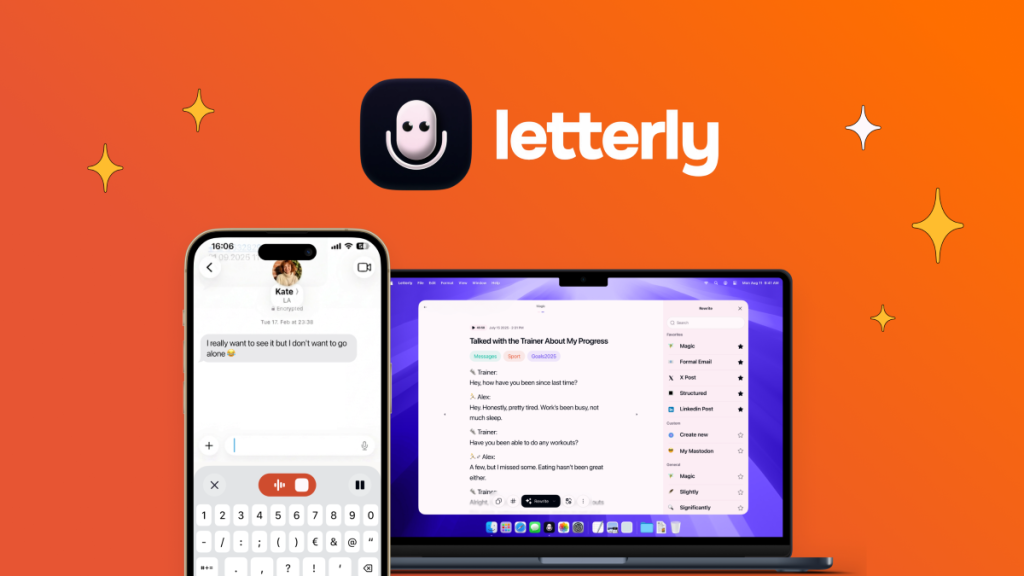
Letterly is an AI-powered speech-to-text app available on iOS, Android, Mac, Windows, Web, iPad, and Apple Watch.
You speak. Letterly listens. Then it turns your raw, unfiltered speech into clean, polished text.
It’s not just a transcription tool. That’s the part that surprises most people when they first try it.
When you record a voice note in Letterly, the AI doesn’t just transcribe what you said word for word. It cleans it up. It removes the “umms” and “ahhs.” It organizes your rambling into structured, readable text.
Then it gives you 27 different ways to rewrite or format that text as a newsletter, a social media post, an email, a meeting summary, a bullet-point list, or even your own custom format.
This is a Letterly review that focuses on real usage, not just features on a spec sheet, so let’s get into what it actually feels like to use.
The Problem This Letterly Review Set Out to Solve
Most people don’t realize how much time they waste typing.
Think about your average day. How many messages do you send? How many notes do you take? How many emails do you write?
Every single one of those is time you could have saved by just speaking.
The problem was never that we couldn’t type fast enough. The problem was that most voice tools were terrible.
They’d transcribe exactly what you said – including every “uh”, every false start, every sentence you never finished.
That left you with a wall of messy text that took just as long to clean up as it would have to type in the first place.
Letterly fixes this. It’s the first voice tool I’ve used where the output is actually ready to use without heavy editing.
Key Features Worth Knowing (This Letterly Review Goes Deep)
Voice to Text That Actually Works
Open the app, hit record, and start talking. That’s it.
Letterly supports over 90 languages and automatically detects which one you’re speaking. You don’t need to set anything up manually.
The transcription accuracy is exceptional. Real users in the AppSumo reviews consistently praise how clean the output is, with one user saying their meeting notes are so good that colleagues constantly ask how they do it.
27 AI Rewrite Formats
This is the feature that makes Letterly genuinely different.
After your recording is transcribed, you can choose how you want the AI to rewrite it. The options include newsletters, LinkedIn posts, Instagram captions, email replies, formal summaries, to-do lists, journal entries, and more.
You can even create your own custom rewrite formats – tell the AI exactly how you want your text structured, and it follows your instructions every time.
Record Anywhere, On Any Device
Letterly syncs across every device you own: iPhone, Android, Mac, Windows, Web, iPad, and even Apple Watch.
Record on your phone and instantly access the text on your desktop.
Switch between devices without losing anything.
You can also record offline, with the screen off, or using the iOS widget with a single tap. No excuse not to capture an idea the moment it hits.
Unlimited Recordings, Up to 90 Minutes Each
This is where Letterly is particularly generous.
Every recording can be up to 90 minutes long, with unlimited recordings across all plans.
This makes it genuinely useful for long meetings, lectures, interviews, and brainstorming sessions – not just quick voice notes.
Meeting Summaries and Dictation Mode
For business users, Letterly has become a go-to for recording meetings and getting a clean summary at the end.
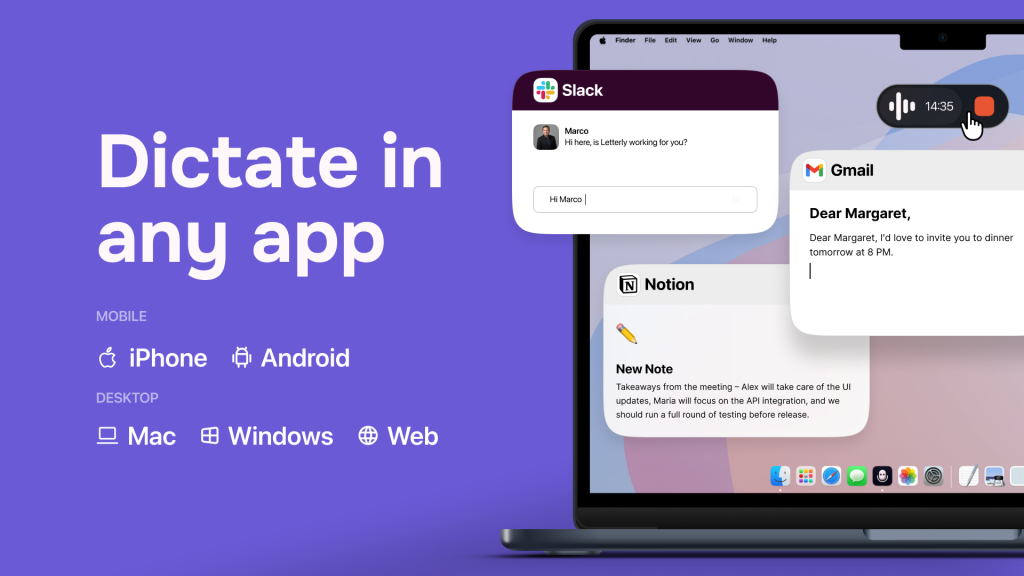
The dictation feature works on iPhone, Android, Mac, and Windows.
Press a key and speak. Your voice becomes text wherever your cursor is, whether that is inside Gmail, Slack, Notion, an AI prompt, a comment box, a form, or even code.
Letterly automatically scrubs every filler word and typo in real time, formatted exactly the way you want. You are not locked into the Letterly app. You dictate directly inside whatever tool you are already working in.
No retyping required.
Record Anything Around You
Letterly is not just for recording your own voice.
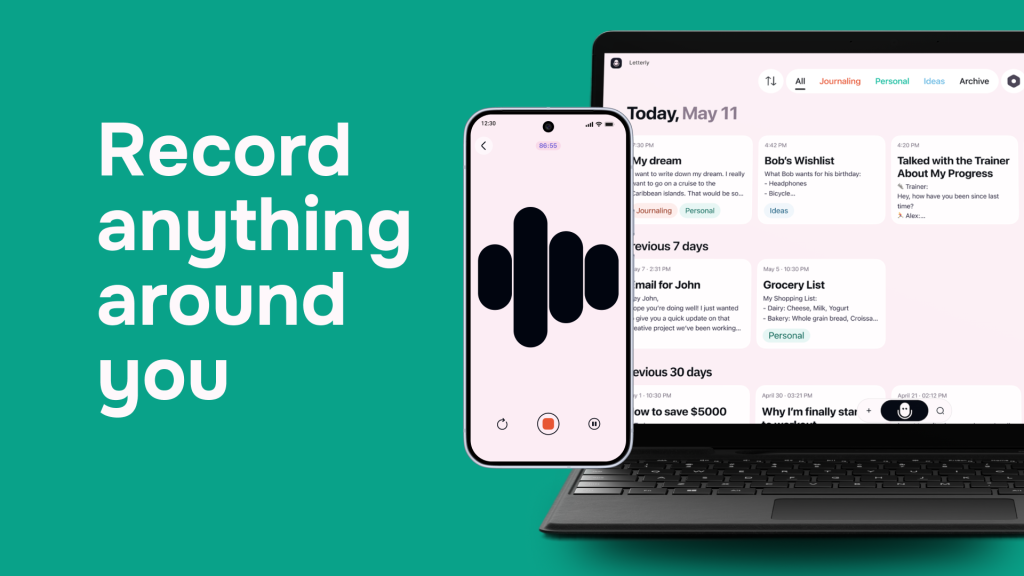
Hit record and get a polished, structured note in seconds.
You can capture notes, meetings, lectures, journaling, and social posts from your own voice or someone else’s. Whatever is happening around you, Letterly captures it and organizes it instantly.
The AI cleans it all up in real time. You get structured, readable output regardless of how messy the conversation was.
You can also connect Letterly to your other tools via Zapier, or prompt Claude or ChatGPT to do things with your notes through MCP connections. This turns Letterly from a simple voice app into a full workflow automation tool.
Get Unlimited Everything
This is one of the most generous parts of the lifetime deal.
With Letterly, you get unlimited recordings, unlimited transcriptions, and unlimited rewrites. There are no credit limits. No monthly caps.
You record as much as you want, rewrite as many times as you need, and Letterly never stops you.
That alone sets it apart from many AI tools that give you a handful of credits and charge you for more.
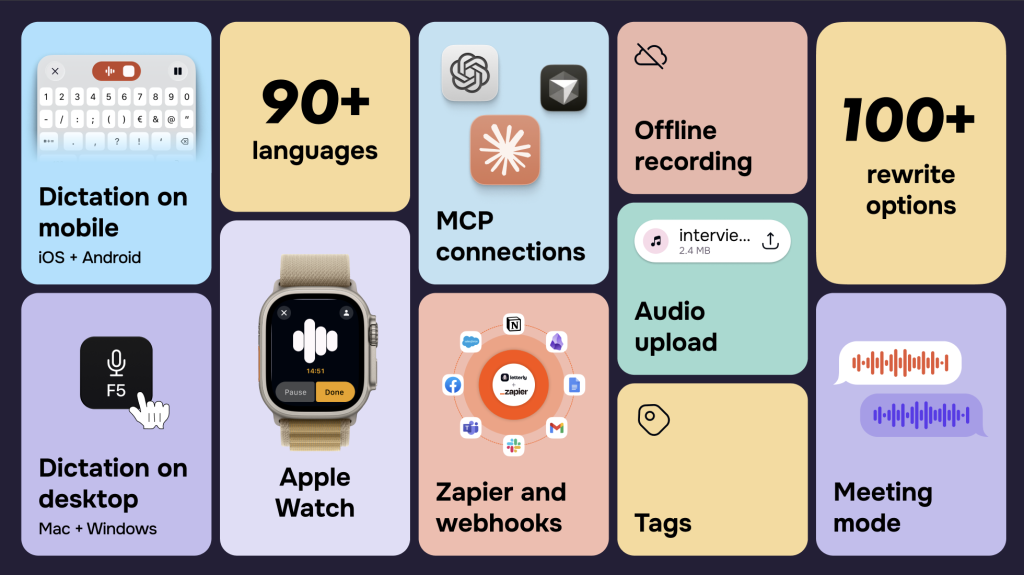
Simplify Writing With Powerful Features
Letterly also includes a translation feature, so you can speak in one language and get your output in another. Over 90 languages are supported with automatic detection.
You unlock 100% of the app’s features with nothing hidden or locked behind higher tiers.
Everything is included in the lifetime deal.
Here is what that unlocks:
Offline recording means you can capture ideas even without the internet. Letterly processes everything once you are back online.
Screen-off recording means your phone can stay in your pocket while Letterly listens. No need to hold your phone or keep the screen active.
Meeting mode is built specifically for recording long conversations and turning them into clean summaries.
Audio upload lets you upload existing audio files and have Letterly transcribe and rewrite them.
Tags help you organize your notes so you can find anything quickly.
Apple Watch support means you can start a recording right from your wrist without touching your phone.
Widget and one-tap recording on iOS and Android mean capturing an idea takes less than a second, whether you are cooking, commuting, or in the middle of a walk.
Who Should Read This Letterly Review?
A good Letterly review has to be honest about who this tool fits, and who it doesn’t.
Letterly is the right fit if you are:
A content creator or blogger who always has ideas but hates sitting down to write. You can talk through a blog post outline on a walk, and Letterly organizes it into a ready-to-use draft.
A small business owner or entrepreneur who attends meetings and needs accurate notes without paying for an expensive transcription service.
A solopreneur or freelancer who sends a lot of client messages and emails and wants to write faster without sacrificing quality.
A student who records lectures and needs summaries rather than raw transcriptions.
Letterly might not be the right fit if you:
Need real-time live transcription during a call or meeting directly inside Zoom or Google Meet. Letterly records separately and processes afterward; it doesn’t integrate live into meeting software.
Need advanced collaboration features across a large team. Letterly is built for individuals and small setups, not enterprise teams.
To summarize this part of the Letterly review clearly: if you work alone or in a small team and you spend time every day capturing thoughts, sending messages, or documenting meetings, Letterly will save you real time every single day.
If you are part of a large enterprise that needs shared workspaces, admin controls, and team-wide transcription management, Letterly is not the right tool yet.
Letterly Pricing: What the AppSumo Lifetime Deal Includes
Here’s where this Letterly review gets really interesting.
On its own website, Letterly charges $99 per year for its Pro plan.
On AppSumo, you can get lifetime access for a one-time payment. That’s it. No renewals. No annual bills. No “your subscription is renewing” emails every year.
The pricing is based on the number of device licenses you need.
One code covers one device. Two codes cover two devices. You can stack as many codes as you need.
Every plan includes the same core features: unlimited recordings, up to 90 minutes per recording, 90+ language support, all 27 rewrite formats, offline recording, screen-off recording, and the iOS widget.
For most solo users, one code is all you need. If you want to use Letterly on both your phone and your Mac, pick up two codes.
What Real Users Are Saying
Letterly currently holds a 4.7-star rating from over 312 reviews on AppSumo. That’s not a small sample size, and the consistency of the feedback is striking.
Users keep coming back to the same points: the transcription accuracy is excellent, the AI rewrites are genuinely useful, and the team behind Letterly is responsive and keeps shipping new features.
One user said they bought Letterly for every member of their family because it made their daily communication so much faster.
Another called it their number one app for long messages.
The most common criticism? Some users want a dedicated desktop app beyond Mac, and a few have asked for better folder organization inside the app.
The founder has been transparent about the roadmap and actively responds to feedback.
For a bootstrapped startup that launched in 2023, the pace of improvement has been impressive. Since launching on AppSumo, Letterly has added long recordings, web and Mac versions, device sync, custom rewrite options, Zapier integration, and more.
What stands out in this Letterly review is how the founder, Anton Lebedev, actively responds to every piece of feedback and builds features directly from user requests.
That level of founder involvement is rare, and it gives buyers real confidence that the tool will keep improving.
AppSumo even named Letterly one of its Tools of the Year for 2024. That does not happen for mediocre products.
- Lifetime deal, no monthly fees
- Exceptional transcription accuracy
- 27 AI rewrite formats built in
- Works offline and with screen off
- Syncs across iOS, Android, Mac, Web
- Active founder, fast updates
- 60-day money-back guarantee
- No live Zoom/Meet integration
- Dictation mode is Mac-only
- No team collaboration features
- Folder organization could be better
How to Get Started With Letterly
Getting started is genuinely easy. Here’s what the first five minutes look like:
Step one: Download Letterly from the App Store or Google Play. You can also use it on the web at letterly.app.
Step two: Choose what you want to use it for – notes, emails, social content, or meetings. This shapes the default rewrite options you’ll see.
Step three: Hit the record button and start talking. Don’t worry about speaking perfectly. Ramble, pause, restart. Letterly handles the cleanup.
Step four: After recording, choose a rewrite format. Pick from the 27 options, or create your own custom prompt.
Step five: Copy the output and use it wherever you need it – paste it into an email, drop it into Notion, send it via WhatsApp, or publish it directly.
The whole process from recording to ready-to-use text takes about 30 seconds for a short note.
For longer recordings, give it a minute or two while the AI processes.
Letterly vs. Otter.ai: What This Letterly Review Found
A lot of people asking about Letterly are coming from Otter.ai, which is one of the most popular transcription apps.
Here’s the key difference: Otter.ai transcribes what you say. Letterly transforms what you say.
Otter gives you a raw transcript. It’s accurate, but you still have to clean it up and format it yourself.
Letterly gives you cleaned, rewritten, structured output that’s ready to use from the moment the AI finishes processing.
If you need raw, live transcription during a Zoom call with speaker identification and shared team access, Otter.ai has more of those collaborative features.
If you want a faster, more personal tool that turns your voice into content you can actually use immediately, Letterly wins that comparison comfortably.
There is also a pricing angle worth noting in this Letterly review. Otter.ai’s paid plans start at $16.99 per month. That is over $200 per year, every year. Letterly on AppSumo is $89 once. The lifetime deal is not even close to the price, especially if your needs are personal rather than team-wide.
For solo users, content creators, and small business owners, this Letterly review comes down firmly on the side of Letterly over Otter.ai unless you specifically need live meeting bot integration.
Real Ways People Use Letterly Every Day
One thing a standard Letterly review often misses is showing how people actually use it in practice, not just what it can do in theory.
Here are some of the most common real-world use cases shared by AppSumo buyers:
Bloggers and content creators record a rough outline or brain dump on their phone during a commute. Letterly converts it into a structured draft. The actual writing time drops dramatically because the hard part (getting the ideas out) is already done.
Coaches and consultants record client session notes immediately after a call while everything is fresh. Letterly turns those notes into a clean, organized summary ready to send to the client or file away.
Small business owners use Letterly to respond to long client emails. Instead of sitting at a keyboard trying to phrase everything correctly, they speak their response naturally, and Letterly formats it into a professional reply.
Students record lectures (where allowed) and have Letterly generate a bullet-point summary at the end. No more trying to type and listen at the same time.
Entrepreneurs and founders use it for capturing ideas and decisions. Speaking into Letterly at the end of a workday creates a running log of decisions and action items without any manual effort.
These are exactly the kinds of use cases that make this Letterly review confident in recommending the tool. It solves real, daily problems without requiring you to change how you work.
Bottom Line: Is the Letterly AppSumo Deal Worth It?
Here’s the honest answer from this Letterly review: yes, for the right person, it is one of the better AppSumo deals available right now. And after going through this Letterly review from top to bottom, the conclusion is clear.
If you capture ideas by voice, attend meetings, send a lot of messages, or create content regularly, Letterly removes friction from all of those.
The lifetime deal pricing makes the math easy. At $89 one-time versus $99 per year, the deal pays for itself in under twelve months. After that, every year is pure savings.
The app is actively developed, the founder is responsive, and the feature set has grown significantly since launch. This is not an abandoned tool.
The only honest caveat: if you specifically need live meeting transcription inside Zoom or Google Meet, or you need a large team to collaborate on the same recordings, Letterly isn’t built for that yet.
For everyone else – if typing is slowing you down, Letterly is worth every dollar.
Letterly turns your voice into polished notes, emails, and content in seconds.
One-time $89 payment. No subscriptions. No renewals. Ever.
Get the Letterly Lifetime Deal →Frequently Asked Questions About Letterly
Is Letterly free? Letterly has a free plan with basic features. The AppSumo lifetime deal unlocks the full Pro plan, including unlimited recordings up to 90 minutes, all 27 rewrite formats, offline recording, and multi-device sync.
What platforms does Letterly work on? Letterly works on iOS, Android, Mac, and Web. The dictation feature (write by voice inside any app) is currently Mac-only.
Can I use Letterly offline? Yes. You can record without an internet connection, and Letterly will transcribe once you’re back online.
How many languages does Letterly support? Letterly supports over 90 languages and automatically detects which one you’re speaking. No manual selection needed.
Does the AppSumo deal include future updates? Yes. The lifetime deal maps to Letterly’s Pro plan and includes all future updates to that plan.
What if I don’t like it? AppSumo offers a 60-day money-back guarantee on the Letterly deal, so there’s plenty of time to test it properly before the purchase becomes final.
Pricing and features reflect publicly available information as of 2026. Always verify current pricing and availability on AppSumo before purchasing.
Explore More on FutureToolLab
- TidyCal vs Calendly: Should You Upgrade or Switch for Good? (2026)
- Heffl Review: Worth It CRM Lifetime Deal? (2026)
- Melio vs BILL: Which Is Best for First-Time Vendor Payments? (2026)
Explore more in-depth software reviews, AI tool guides, and the best deals at FutureToolLab.com
Share Letterly review

2 thoughts on “Letterly Review 2026: I Stopped Typing Forever”