

Best Free AI Tools for Small Business Owners in 2026. Running a small business in 2026 means you are competing against companies with bigger teams, bigger budgets, and more resources.
But here is the thing most people are not saying out loud: the free tiers of AI tools in 2026 are genuinely good. Not “good for free,” just good. The gap between free and paid has never been smaller, and that is a massive opportunity for small business owners who know which tools to use.
This guide cuts through the noise. We reviewed dozens of options and selected the best free AI tools that deliver real results for small business owners tools you can set up today with zero technical experience and start saving time within the first week.
Top Free AI Tools for Small Business Owners in 2026
Before we get into the list, here is the simple test every tool had to pass:
- Does the free plan do meaningful work, not just a demo?
- Can a non-technical business owner use it within minutes of signing up?
- Does it save time on tasks you do every single day?
- Does it integrate with tools you likely already use?
Every tool below passed all four. Let’s get into it.
In this guide, we reviewed the best free AI tools for small business owners to help save time and grow faster in 2026.
1. ChatGPT — Best All-Round AI Assistant
Free plan: Yes, access to GPT-4o with usage limits. Paid plan: $20/month (Plus) Best for: Writing, research, planning, customer communication, content creation
ChatGPT is the Swiss Army knife of AI tools for small businesses. It handles writing, brainstorming, research, summarizing documents, drafting emails, creating social media posts, and more, all through a simple chat interface.
What makes ChatGPT stand out for small businesses is its flexibility. You do not need to know how to code or configure anything. You type what you need, and it delivers.
Real business use cases:
- Draft a professional email response to a difficult client in 30 seconds
- Generate a week’s worth of social media captions from a single prompt
- Summarize a long contract or report into bullet points
- Create a business plan outline or marketing strategy
- Answer customer FAQs and turn them into website copy
Free plan limitations: Around 10 messages every few hours on GPT-4o, with unlimited access to GPT-4o mini. For most small business owners, the free plan is enough to get meaningful work done daily.
Pros:
- Handles almost any task you throw at it
- No setup required, start in 60 seconds
- Regular updates and new features
- Works on mobile and desktop
Cons:
- The free plan has message limits during peak hours
- Responses need human review before publishing
- Output quality depends on how well you write your prompts
Bottom Line: If you only use one AI tool, make it ChatGPT. It replaces hours of writing, research, and planning work every week.
2. Claude — Best for Long Documents and Business Writing
Free plan: Yes, daily access to Claude Sonnet. Paid plan: $20/month (Pro) Best for: Writing proposals, contracts, emails, analyzing documents, client communication
Claude is built by Anthropic and has quickly become the preferred AI for business owners who deal with longer, more nuanced writing tasks. Where ChatGPT is fast and versatile, Claude is precise and thoughtful — making it ideal for writing proposals, client-facing documents, and anything where the quality and tone of writing really matter.
One of Claude’s biggest practical advantages is its ability to read and analyze long documents. Paste in a contract, a supplier agreement, or a lengthy report, and Claude will summarize it, flag key points, and answer specific questions about it.
Real business use cases:
- Write a polished client proposal or quote
- Analyze a supplier contract and highlight important terms
- Draft a professional complaint or follow-up email
- Create detailed blog posts or website copy
- Summarize lengthy research into actionable insights
Free plan limitations: Daily message limits on Claude Sonnet. More than sufficient for a small business owner handling daily writing and communication tasks.
Pros:
- Excellent writing quality sounds natural and professional
- Handles very long documents without losing context
- Strong at nuanced, tone-aware communication
- No setup required
Cons:
- Free tier has daily limits
- Less versatile than ChatGPT for tasks like image generation
- Not as widely known, so fewer tutorials are available
Bottom Line: If your business involves a lot of writing, proposals, or document analysis, Claude is worth using alongside or instead of ChatGPT. These free AI tools for small business owners are a good starting point…
3. Google Gemini — Best Free AI Built Into Tools You Already Use
Free plan: Yes, Gemini 2.0 Flash is built into Gmail, Docs, and Google Search. Paid plan: $19.99/month (Gemini Advanced add-on) Best for: Drafting emails in Gmail, writing in Google Docs, research
Here is the advantage most small business owners are sleeping on: if you use Gmail or Google Docs, you already have access to a capable AI assistant completely free.
Gemini sits inside Gmail and helps you draft, summarize, and respond to emails faster. Inside Google Docs, you can write, edit, and rewrite content as you work. And in Google Search, AI Overviews powered by Gemini now answer many business research questions directly.
No separate app to download. No new account to create. It is already there.
Real business use cases:
- Click “Help me write” in Gmail to draft a professional reply in seconds
- Open Google Docs and ask Gemini to write a first draft of a report
- Use Gemini in Google Search to quickly research competitors or market trends
- Summarize long email threads with one click
Free plan limitations: The free Gemini features in Gmail and Docs are available to all Google account users. The more powerful Gemini Advanced (with deeper context and more complex tasks) requires a paid add-on.
Pros:
- Already built into Gmail and Google Docs, with zero setup
- Free for anyone with a Google account
- Great for email drafting and document writing
- No switching between apps
Cons:
- Less powerful than ChatGPT or Claude for complex tasks on the free tier
- Full AI features in Workspace require a paid add-on
- Best value only if you already use Google’s tools
Bottom Line: If your business runs on Gmail and Google Docs, turn on Gemini today. It is the easiest free AI upgrade you will make this year.
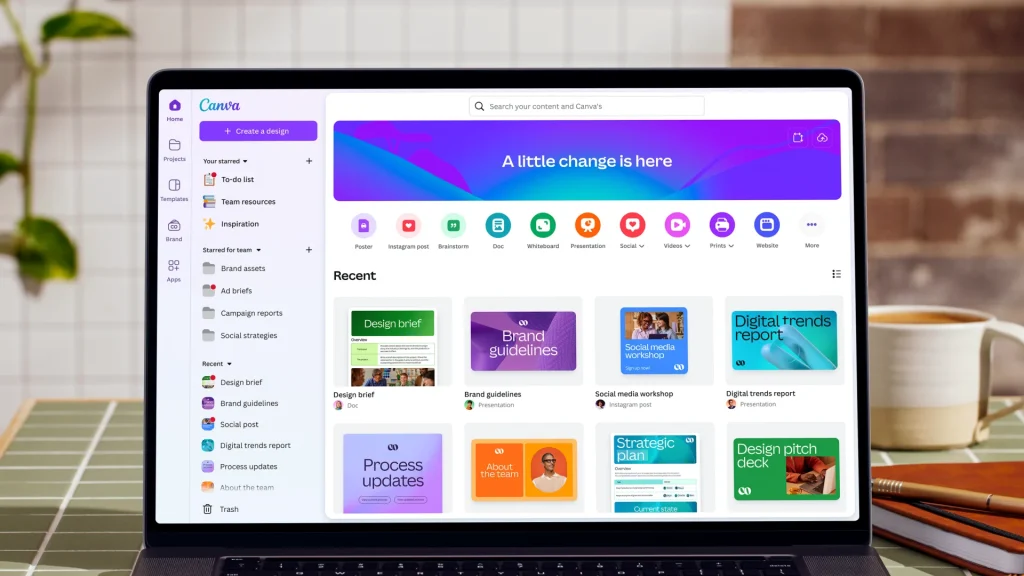
4. Canva AI — Best for Marketing Visuals and Design
Free plan: Yes, generous free tier with AI features included. Paid plan: $15/month (Pro) Best for: Social media posts, presentations, logos, marketing materials, video creation
Small businesses need visuals constantly, such as social media posts, flyers, presentations, email headers, and promotional graphics. Canva AI makes professional design accessible to anyone, with or without design experience.
The free plan includes access to Canva’s AI image generator, Magic Resize (which instantly resizes any design for different platforms), background remover, and hundreds of ready-made business templates.
Real business use cases:
- Design professional social media posts in minutes using templates
- Create a branded presentation for a client pitch
- Generate a custom image for a blog post or marketing campaign
- Resize one design into Instagram, Facebook, and LinkedIn formats simultaneously
- Build a simple logo or brand kit
Free plan limitations: The free tier is genuinely capable for most small business visual needs. Some premium templates and advanced AI features are locked behind the Pro plan.
Pros:
- No design skills required
- Hundreds of free business templates
- AI tools included on the free plan
- Works in browser, no software to install
- Great mobile app
Cons:
- Advanced AI features and premium assets require Pro
- Not a replacement for professional brand design
- Large projects can feel slow in the browser
Bottom Line: For small business marketing visuals, Canva’s free plan is one of the best deals in software. Most businesses will never need to upgrade.
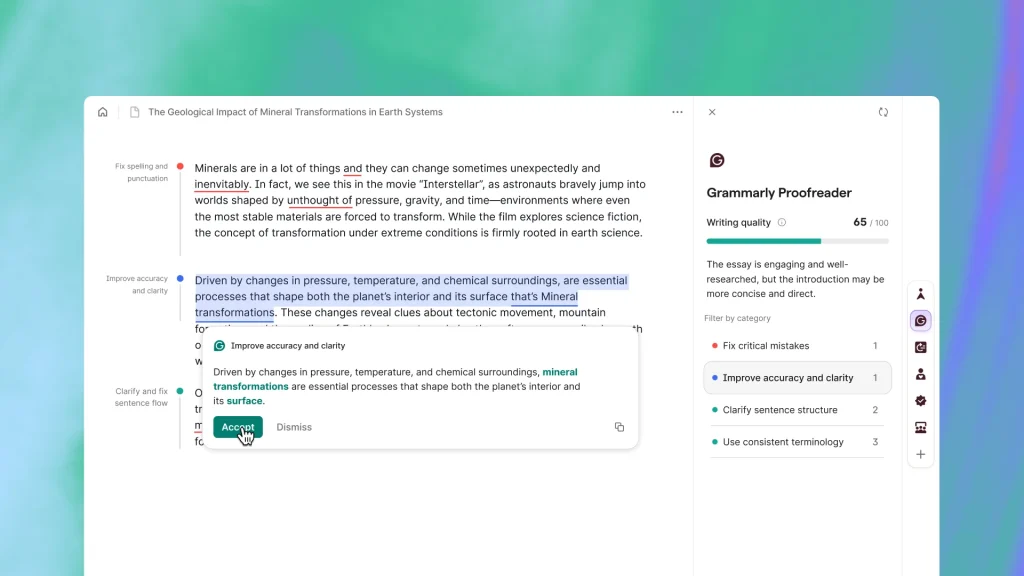
5. Grammarly — Best for Professional Communication
Free plan: Yes, grammar, spelling, and basic tone suggestions. Paid plan: $12/month (Pro) Best for: Emails, proposals, website copy, social media, any written communication
Every small business owner writes constantly, emails to clients, proposals, social posts, product descriptions, and website copy. Grammarly ensures everything you send looks polished and professional, even if writing is not your strength.
It works directly inside Gmail, Google Docs, Microsoft Word, and your browser, checking your writing in real time and suggesting improvements as you type.
Real business use cases:
- Catch embarrassing grammar mistakes before sending client emails
- Improve the clarity and tone of proposals and quotes
- Make website copy and product descriptions easier to read
- Check social media posts before publishing
- Get tone suggestions (does this email come across as too formal or too casual?)
Free plan limitations: The free plan covers grammar, spelling, punctuation, and basic clarity. Advanced tone adjustments, full rewrite suggestions, and plagiarism detection require Pro.
Pros:
- Works everywhere you write — Gmail, Docs, Word, browser
- Catches mistakes instantly
- Improves confidence in written communication
- Easy to install — one browser extension
Cons:
- Advanced suggestions require a paid plan
- Occasionally over-corrects natural, conversational writing
- English-focused (limited support for other languages)
Bottom Line: For the price of free, there is no reason not to have Grammarly installed. It will save you from embarrassing errors and improve every piece of writing you send.
6. Perplexity — Best for Fast, Reliable Research
Free plan: Yes, unlimited standard searches with source citations. Paid plan: $20/month (Pro) Best for: Market research, competitor analysis, fact-checking, learning new topics fast
Most small business owners spend significant time researching, checking competitors, understanding market trends, looking up regulations, or learning about new tools. Perplexity replaces hours of browser tab-hopping with a single, sourced answer.
Unlike a standard Google search, Perplexity reads the web and gives you a direct, summarized answer with every source cited so you can verify it. This matters when you cannot afford to repeat incorrect information to a client.
Real business use cases:
- Research a competitor’s pricing and positioning in minutes
- Find out about regulations or requirements in your industry
- Get a quick summary of a trending topic to include in a blog post
- Fact-check a claim before using it in a proposal
- Research tools before you buy them
Free plan limitations: Standard searches are unlimited and genuinely capable. Pro unlocks faster models, more detailed research reports, and higher daily limits.
Pros:
- Every answer comes with sources — no more wondering if it is accurate
- Faster than traditional Google research for most queries
- Clean, simple interface
- Understands complex, multi-part questions
Cons:
- Advanced research depth requires a paid plan
- Not ideal for creative tasks — strictly a research tool
- Sources should still be spot-checked for critical decisions
Bottom Line: For any small business owner who spends time researching, Perplexity saves real hours every week while being more reliable than a basic Google search.
Small businesses no longer need expensive software to compete. Today, free AI tools for small business owners can help automate tasks, improve marketing, create content, and save valuable time.
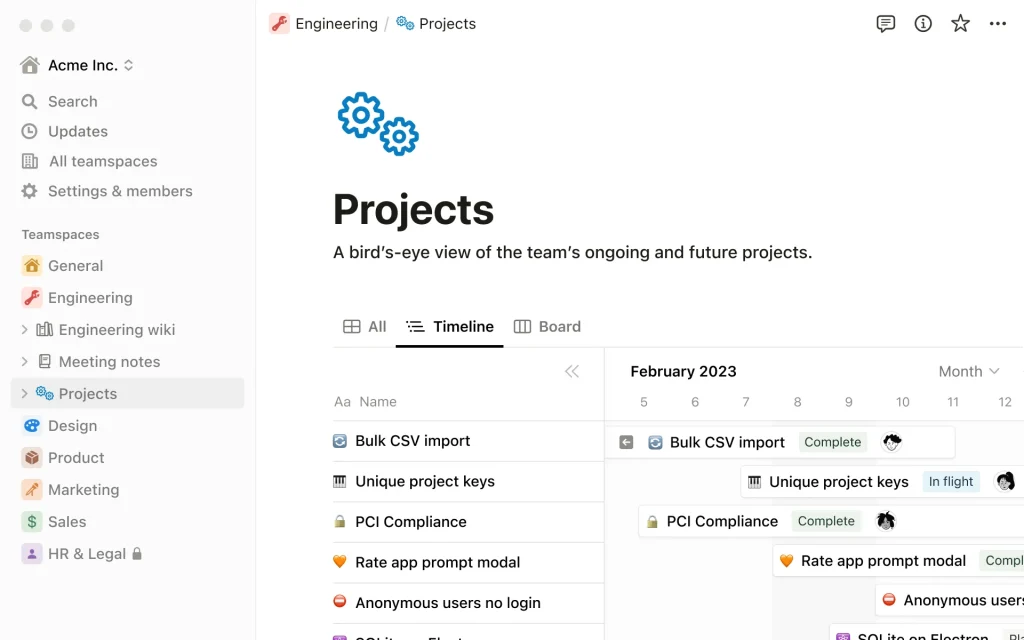
7. Notion AI — Best for Organizing Your Business
Free plan: Yes, workspace available free; AI features require the Plus plan ($10/month). Paid plan: $10/month (Plus, includes full AI access) Best for: Project management, meeting notes, team documentation, content planning
Notion is where small business owners go when their ideas, tasks, and documents are scattered across five different apps. It brings everything notes, projects, databases, wikis, and team communication — into one organized workspace.
The AI layer turns Notion into something more powerful. It can summarize meeting notes, generate task lists, write first drafts, and answer questions about anything stored in your workspace.
While the AI features are not completely free (they require the $10/month Plus plan), the core workspace is free and powerful on its own, making it easy to start for nothing and upgrade when ready.
Real business use cases:
- Build a simple CRM to track clients and deals at no cost
- Create a content calendar for your blog and social media
- Document your business processes so your team always knows what to do
- Summarize meeting notes automatically with AI
- Manage projects with kanban boards and task lists
Free plan limitations: The workspace is free for individual use. AI features and team collaboration require the Plus plan at $10/user/month.
Pros:
- Replaces multiple apps, notes, projects, wikis, and databases
- Highly customizable to any workflow
- AI features are genuinely useful for summarizing and organizing
- Large library of free business templates
Cons:
- Learning curve for new users takes a few days to set up well
- AI features are not fully free
- Can feel complex for very simple needs
Bottom Line: If your business information is scattered everywhere, Notion is the tool that brings order to the chaos. Start free and upgrade only when your team grows. That’s why we include the tool in our free AI tools for small business owners.
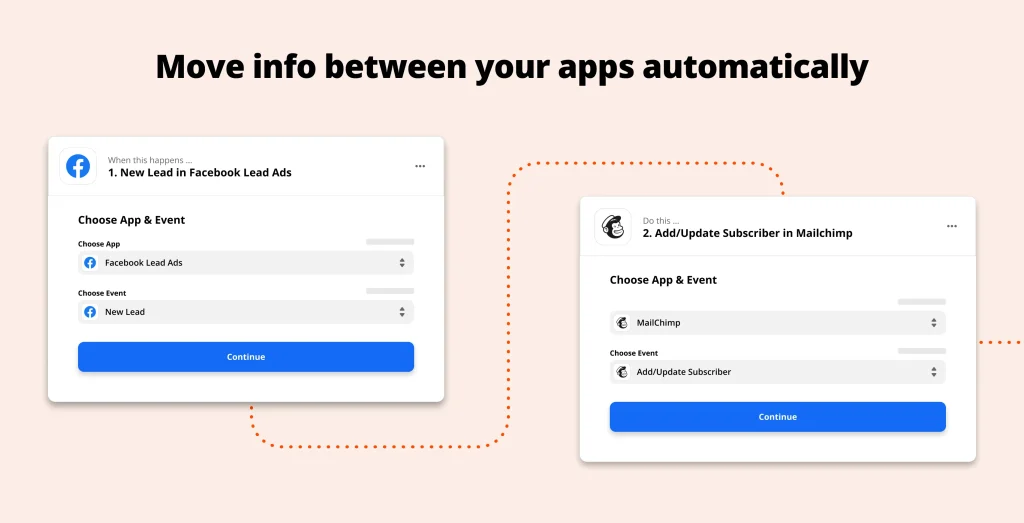
8. Zapier — Best for Automating Repetitive Tasks
Free plan: Yes, 100 automated tasks per month, 2-step workflows. Paid plan: From $19.99/month (Starter) Best for: Connecting apps, automating data entry, saving time on repetitive admin work
Every small business has tasks that happen the same way, every single time a new lead comes in, you create a contact in your CRM, send a welcome email, and create a task in your project tool. Zapier automates that entire sequence without you touching it.
In 2026, Zapier’s AI layer lets you build these automations by describing what you want in plain English, no coding, no technical setup, just “when this happens, do that.”
Real business use cases:
- Automatically save new form responses into a spreadsheet
- Send a Slack notification every time you get a new customer email
- Add new customers to your email list automatically
- Create tasks in Notion or Asana when a new order comes in
- Sync data between apps without manual copy-pasting
Free plan limitations: The free plan allows 100 tasks per month and two-step automations. For many small businesses starting, this is enough to test and see the value before upgrading.
Pros:
- Connects with 6,000+ apps
- AI lets you build automations in plain English
- Saves significant time on repetitive admin
- No coding required
Cons:
- Free plan limits are low for busy businesses
- Complex multi-step workflows require paid plans
- Some apps require premium connectors
Bottom Line: Even the free plan of Zapier will save you hours every week by eliminating repetitive manual tasks. Start with one automation and build from there.
Whether you run a startup or a local business, choosing the right free AI tools for small business owners can improve productivity without increasing costs.
Quick Comparison Table
| Tool | Best For | Free Plan | Paid Plan |
|---|---|---|---|
| ChatGPT | All-round AI assistant | ✅ Yes | $20/month |
| Claude | Business writing & documents | ✅ Yes | $20/month |
| Google Gemini | Gmail & Google Docs users | ✅ Yes | $19.99/month |
| Canva AI | Marketing visuals & design | ✅ Yes | $15/month |
| Grammarly | Professional communication | ✅ Yes | $12/month |
| Perplexity | Fast, sourced research | ✅ Yes | $20/month |
| Notion AI | Business organization | ✅ Workspace only | $10/month |
| Zapier | Automating repetitive tasks | ✅ Limited | $19.99/month |
Many of the free AI tools for small business owners included in this guide offer generous free plans, making them ideal for testing before upgrading.
How to Build Your Free AI Stack Without Overwhelm
The biggest mistake small business owners make with AI tools is trying to use too many at once. You do not need all eight. Here is a simple starting point based on what your business actually needs:
If you just need to write faster: → Start with ChatGPT + Grammarly. Both are free, take five minutes to set up, and work together perfectly.
If you run on Gmail and Google Docs: → Turn on Gemini in Gmail, add Grammarly to your browser, and you have an AI-powered communication setup with zero cost.
If you manage clients and projects: → Use Notion (free workspace) + ChatGPT. Notion organizes your work; ChatGPT helps you write and plan.
If you create content for social media or marketing: → Canva AI + ChatGPT. Canva handles the visuals; ChatGPT writes the captions and copy.
If you want to stop doing repetitive admin: → Zapier’s free plan is your starting point. Set up one automation this week.
The goal is not to use more tools. The goal is to spend less time on work that does not need you. And these free AI tools for small business owners are here to guide you.
Are Free AI Tools Enough for a Small Business?
Honestly — yes, for most tasks.
The free tiers of ChatGPT, Gemini, Canva, Grammarly, and Perplexity are strong enough to handle the daily needs of most small businesses in 2026. You can write professional emails, create marketing graphics, research competitors, organize your business, and automate repetitive tasks without spending a single dollar.
Where paid plans make sense is when you hit consistent limits — when you are sending so many emails that Grammarly’s free suggestions are not enough, or when your business generates more than 100 Zapier tasks per month. Start free, prove the value, then upgrade with confidence.
The best free AI tools for small business owners are not always the most popular ones — they are the tools that solve real business problems efficiently.
Final Thoughts
Small businesses that win in 2026 are not the ones using the most AI tools. They are the ones using the right tools consistently and well.
Pick two or three from this list that match your biggest daily time drains. Use them every day for two weeks. You will never go back.
Explore more guides, reviews, and tool comparisons related to free AI tools for small business owners at FutureToolLab.com — updated weekly.
Related Articles on FutureToolLab:
- 10 Best Business Tools in 2026 That Actually Save You Time
- Best AI Productivity Tools in 2026
- ChatGPT vs Claude vs Gemini — Which Is Best for Business? (Coming Soon)
- How to Use ChatGPT to Write Blog Posts — Step-by-Step Guide (Coming Soon)
Tags: AI Tools, Free AI Tools, Small Business, AI for Business, Productivity, ChatGPT, Claude, Canva AI, Grammarly, Zapier, Google Gemini, Business Growth 2026, free AI tools for small business owners