

Updated June 2026
You published your blog.
You checked that it is indexed.
You waited weeks.
Still nothing in Google search.
No impressions. No clicks. No rankings.
Why my blog is not showing up on Google is one of the most common questions bloggers ask after their first few months of publishing. The answer is rarely one thing.
It is a sequence of stages, and most blogs fail silently at one of them without the blogger knowing which stage the problem actually lives in.
This guide explains each stage clearly, shows you where the problem usually is, and points you to the right fix.
Before any fix, you need to understand what each of these words actually means.
Published means your post is live on your website, and anyone with your URL can read it.
Indexed means Google has crawled your page and added it to its database. It can now appear in search results in theory.
Showing means Google is actively displaying your page in search results for relevant queries; this is measured in impressions inside Google Search Console.
Ranking means your page appears in a position high enough that real people can see it, typically, position one to ten on the first page.
Traffic means people are actually clicking your link in search results and visiting your site.
Most bloggers skip straight from published to traffic and wonder why nothing is happening.
The reality is that each stage has its own requirements. Passing one does not guarantee passing the next.
Section 1: Nobody Is Searching for Your Topic
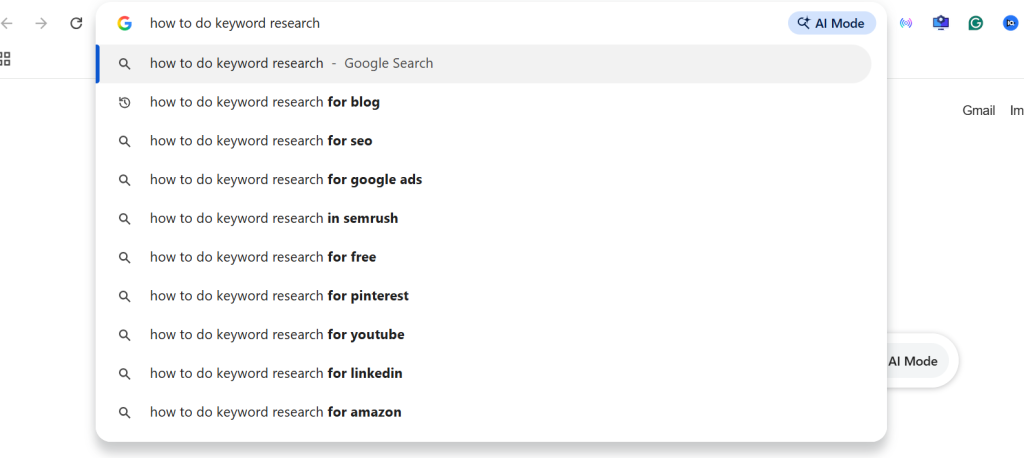
This is where most blogs fail before they even begin, and it is one of the top reasons why my blog is not showing up on Google, even after months of effort.
A blog post can be perfectly written, properly indexed, and completely invisible because nobody is searching for the topic.
Google shows your page when someone searches a phrase that matches your content, but if nobody types that phrase, nobody sees your page. Zero impressions, Zero clicks, Zero traffic.
This is not a technical problem; it is a research problem.
Before writing any post, the question is not “what do I want to write about?” but “what are people already searching for?”
The difference between a topic nobody searches and a topic with genuine demand is the difference between a post that gets found and one that sits invisible forever.
If you are regularly publishing and seeing zero impressions across all your posts, keyword research is where to start.
Read: How to Do Keyword Research for a Blog in 2026
Section 2: Google Has Not Indexed Your Page
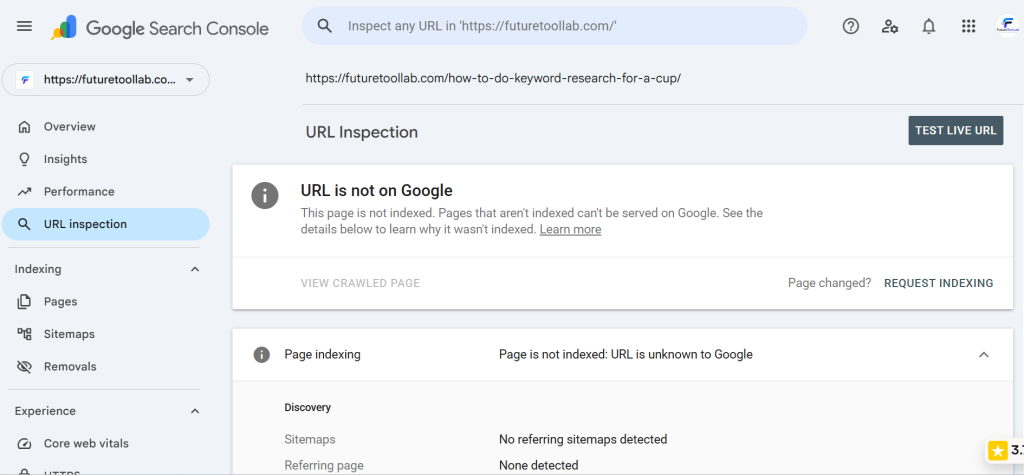
Publishing a post does not mean Google has seen it.
Google discovers new content by crawling the web; its crawler visits sites, reads pages, and decides what to add to its index. Until your page is indexed, it does not exist in Google’s database and cannot appear in any search result.
A page can be published and completely invisible on Google simply because Google has not crawled it yet.
This is especially common on new blogs for which Google has not yet established a crawl schedule.
The fastest way to check is to open Google Search Console and use the URL inspection tool, paste your post URL, and if it says the URL is not on Google, that is your problem.
From the same screen, you can click Request Indexing to ask Google to crawl the page sooner.
You can also check your full indexing status by going to Indexing and then Pages inside Search Console. This shows you exactly which pages are indexed and which are not, and why.
Common indexing blockers include a noindex tag applied accidentally, a WordPress setting that discourages search engines, a robots.txt file blocking crawlers, or simply being a new site that Google has not prioritised crawling yet.
Read: How to Know If Google Indexed Your Blog
Section 3: Your Content Does Not Deserve Visibility Yet
This is the hardest stage to hear about, but the most important to understand.
Google indexes billions of pages, and for every search query, it has to choose which pages to show, and it chooses based on relevance, quality, and authority.
Being indexed does not mean being chosen.
If your post covers a topic that ten thousand other pages cover better, Google will show those pages and not yours; your page is indexed, and it just loses the competition.
This is not permanent, but it requires honest assessment.
The questions to ask about any underperforming post:
Does this post fully answer the question someone would search for this keyword for?
Does it match what the top three results are doing for this keyword?
Is it structured so that readers can find the answer quickly?
Does it have any internal links connecting it to the rest of the site?
Most posts that fail at this stage are not bad; they are just incomplete, too thin, or structured in a way that does not match what Google is rewarding for that specific keyword.
The fix is not to delete and rewrite from scratch; it is to study what is already ranking for your keyword and identify what your post is missing.
Read the top three results carefully.
- Note how they open.
- Note what subheadings they use.
- Note whether they answer the question directly or bury the answer deep in the post.
- Note whether they include examples, visuals, or specific data.
Then update your post to cover what the competition covers and to do it in a clearer, more useful way. This targeted improvement always moves underperforming posts upward within four to six weeks.
Read: How to Write Blog Posts That Rank on Google
Section 4: Your Site Is Too New
One of the most frustrating answers to why my blog is not showing up on Google is simply this: your site is too new, and Google has not built enough trust in it yet.
When a site launches, Google treats it cautiously: it crawls new sites less frequently and ranks their pages lower while it gathers signals about whether the site is reliable, consistent, and genuinely useful.
This is sometimes called the Google sandbox, an informal period where new sites get limited visibility regardless of content quality.
This is not a problem you can fix. It is a period you have to move through.
What you can do during this period:
Publish consistently. Google crawls sites more frequently when they update regularly.
Build internal links between your posts so Google can discover and connect your content.
Submit your sitemap through Google Search Console, so Google knows everything that exists on your site.
Get your first external link, even one or two links from relevant sites, signals to Google that your content is worth referencing.
The typical sandbox period for a new blog is three to six months; some sites see movement earlier, while some take longer. There is no guaranteed timeline.
The worst thing to do during this period is nothing, and the best thing is to keep publishing, keep improving, and keep monitoring Search Console.
One thing that accelerates this period is getting even a small number of external links pointing to your site, a link from another relevant blog, a mention in a forum, or a shared article, which tells Google that your site exists and is being noticed by others.
You do not need hundreds of links; just two or three genuine references from relevant sources can shorten the time before Google begins showing your pages in search results.
Section 5: You Are Expecting Rankings Too Early
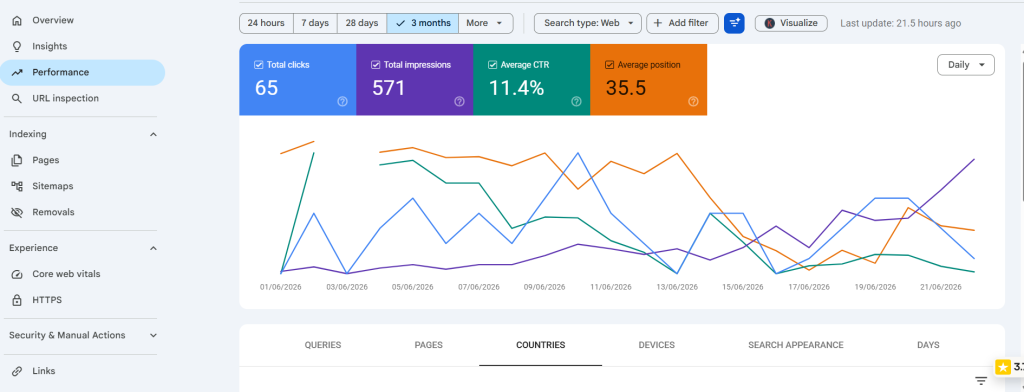
Most bloggers check their rankings too soon and draw the wrong conclusions.
Publishing a post and checking where it ranks three days later is not meaningful data because Google takes time to evaluate new content, test it in various positions, and settle on where it belongs.
For a new blog, most posts need three to six months before showing meaningful impressions. Some need longer.
This is not a sign that something is wrong. It is how Google works.
What you should be tracking instead of rankings:
Impressions in Google Search Console: This shows you that Google is showing your page to people, even if they are not clicking yet.
Average position: This shows you whether your page is moving up or down over time.
Indexed page count: This shows whether Google is discovering and adding your content.
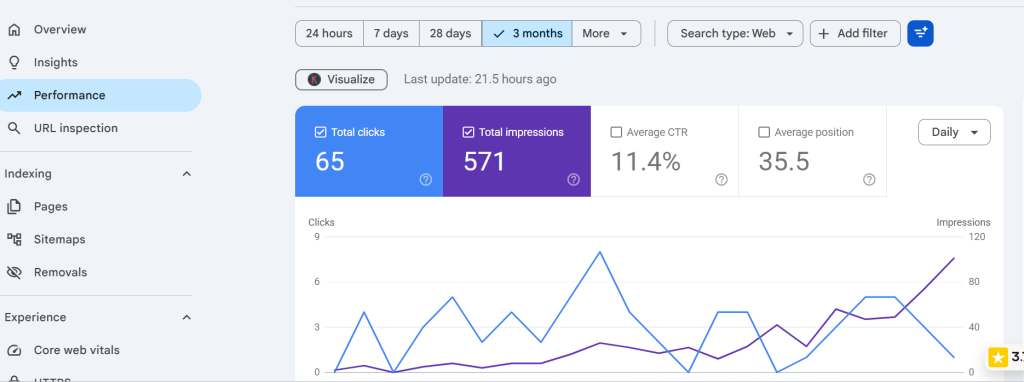
The pattern for a healthy new blog in Search Console looks like this: impressions start very low, gradually increase over weeks, and then begin climbing more steeply around the three to six month mark as Google builds trust in the site.
If you are seeing zero impressions after three months of regular publishing, that points back to earlier stages of keyword research, indexing, or content quality.
A healthy benchmark for a new blog: by month three, you should see at least some impressions on some posts.
By month six, you should see impressions growing across multiple posts; by month nine, you should see some posts beginning to generate consistent clicks.
If you are significantly behind this benchmark, the earlier sections of this guide contain the explanation.
Section 6: Your Internal Linking Is Weak
Internal links are the pathways Google uses to discover and understand your content.
When you publish a new post and no other post on your site links to it, Google may not find it during its next crawl. Even if it does find it, it has no context for how that post relates to the rest of your site.
Strong internal linking does three things:
It helps Google discover new content faster.
It tells Google which posts are most important by showing how many other posts point to them.
It helps readers find related content and stay on your site longer, which sends positive signals back to Google.
For every new post you publish, go back to two or three of your existing posts and add a natural link to the new one.
For every pillar article, make sure all supporting articles link back to it; this is how content clusters work in practice.
A site where every post is an island with no connections to other posts is significantly harder for Google to understand and rank than a site where posts naturally reference and support each other.
The practice of grouping related posts together with internal links is called content clustering.
- A main pillar article covers a broad topic.
- Supporting articles go deep on specific aspects.
- and each supporting article links back to the main one.
This structure tells Google that your site has genuine depth on a subject. Sites that demonstrate depth on a topic consistently outrank sites that cover the same topic with one shallow post.
Building this structure takes time, but the impact on visibility compounds significantly over six to twelve months.
Section 7: You Are Measuring Clicks Instead of Impressions
This is one of the most common measurement mistakes new bloggers make.
They open Search Console, see zero clicks, and conclude the blog is not working.
But clicks require impressions first. And impressions require indexing first.
The correct diagnostic sequence is:
Zero impressions → indexing or keyword problem.
Impressions but zero clicks → title or meta description problem.
Clicks but no conversions → content or page experience problem.
If you go straight to clicks and ignore impressions, you misdiagnose the problem and fix the wrong thing.
For a blog that is genuinely not showing up on Google, the question to ask in Search Console is not “how many clicks am I getting” but “how many impressions am I getting.”
Zero impressions on every post after three months means Google is either not indexing your content or your keywords have no search demand.
Some impressions but very few clicks means Google is showing your pages, but people are not finding your title compelling enough to click.
Understanding which of these you are dealing with tells you exactly what to fix.
One more thing worth knowing about impressions: they appear in Search Console with a delay; data from today typically shows up in Search Console two to three days later.
Do not check the last 24 hours and conclude nothing is happening.
Set your Search Console date range to the last 28 days or last three months for a meaningful picture.
Also note that Search Console only shows data for queries where your page appeared in the top 1,000 results.
If your pages are ranking below position 1,000 for every query, Search Console will show zero impressions even if your pages are indexed. This situation typically resolves as content improves and the site gains more authority over time.
Section 8: How Long Should You Actually Wait?
There is no single answer. But here are honest, realistic timelines based on what actually happens for new blogs.
First impressions: most new blogs see their first impressions in Search Console within four to eight weeks of publishing their first posts, assuming the site is indexed, and keywords have search demand.
First meaningful traffic – positions low enough to generate real clicks typically appear between three and six months for new blogs with consistent publishing.
Competitive positions – ranking in the top five for moderately competitive keywords on a new blog typically takes six to twelve months of consistent publishing, improving existing content, and building internal links.
What speeds this up:
Publishing consistently rather than sporadically.
Targeting specific, lower-competition keywords rather than broad terms.
Building internal links between every post you publish.
Improving posts that show impressions but have low clicks.
Getting any external links pointing to your site from relevant sources.
What slows this down:
Publishing once and waiting months before the next post.
Targeting keywords that are too broad or too competitive for a new site.
Leaving posts as islands with no internal links connecting them.
Never updating or improving underperforming content.
The bloggers who see results within six months are almost always the ones publishing consistently, targeting specific keywords, and monitoring Search Console weekly rather than guessing.
One practical habit that makes a real difference: spend 30 minutes in Search Console every week.
Look at which posts are getting impressions, look at which posts are gaining or losing average position, and look at which queries are showing your pages.
That data tells you what to improve, what to expand, and what is already working. Making decisions based on real data rather than assumptions is what separates blogs that grow from blogs that stall at the same traffic level for months.
Section 9: What to Fix First
The order you fix problems matters.
Improving your content before confirming your pages are indexed is wasted effort, and fixing your titles before confirming people search for the keyword is wasted effort.
Work through this sequence in order.
First – confirm indexing.
Open Google Search Console and check the URL inspection for your most important posts and confirm they are indexed. If they are not, request indexing and check for technical blockers.
Second – confirm keyword demand.
Search your target keywords on Google manually. Confirm that real search results exist for those phrases. If you see very few results or only massive authority sites, the keyword may not have enough demand or may be too competitive.
Third – check impressions.
In Search Console, look at your impressions over the last three months. If you have impressions, Google is showing your pages. The problem is now the title or content quality. If you have zero impressions, go back to steps one and two.
Fourth – improve content before publishing more.
If your indexed posts have impressions but low clicks, improve the title and meta description first. If they have clicks but high bounce rates, improve the content structure and the depth of the answer.
Fifth – build internal links.
Go through your published posts and add internal links between related content. Connect every supporting post to the main pillar article on that topic.
Sixth – wait and monitor.
After fixing the above, give it four to six weeks and check Search Console again. The data will tell you whether the fixes worked and what to address next.
The mindset that makes this process work:
Every week you spend in Search Console looking at real data is more valuable than every week you spend guessing what to change.
The blogs that figure out why their blog is not showing up on Google and fix the right stage systematically are the ones that eventually break through. The blogs that keep publishing without diagnosing rarely do.
Set a reminder to review Search Console every Monday. Look at three things: which pages gained impressions, which pages lost impressions, and which pages have impressions but very few clicks. Those three data points give you a clear priority list for the week.
This is not complicated. But it is consistent. And consistency over six to twelve months is what produces a blog that shows up on Google reliably.
Frequently Asked Questions
Why is my blog indexed but not showing in search results?
Indexing means Google has your page in its database; showing means Google chooses to display it for specific searches. Lastly, being indexed does not guarantee being shown.
If your content does not match what Google considers the best result for a query, it will index your page but show other pages instead. Improving content quality and keyword matching is the fix.
Can blog posts disappear from Google after ranking?
Yes. Google regularly recrawls and re-evaluates content. Posts that were ranking can drop if newer, more relevant content from other sites outperforms them, if your content becomes outdated, or if Google updates its quality assessment criteria.
Regular content updates help maintain and recover rankings.
How long before Google starts showing my blog?
For a new blog with properly indexed content targeting keywords with genuine search demand, first impressions typically appear within four to eight weeks.
Consistent visibility in meaningful positions usually takes three to six months of regular publishing and improvement.
Does updating old posts help with visibility?
Yes. Updating posts with more depth, better keyword matching, and improved structure signals to Google that the content is fresh and relevant.
Search Console often shows improvement in impressions and position within four to six weeks of a meaningful content update.
Should I delete posts that are not ranking?
Not immediately. A post that is indexed but not ranking is not necessarily a lost cause. Before deleting, try improving it with better keyword targeting, more depth, and stronger internal links.
Deleting indexed content removes it from Google entirely and can negatively affect your overall site authority if done in large volumes.
Final Verdict
Most blogs that are not showing up on Google are not invisible forever.
They are early.
Or they are stuck at one stage that nobody told them to check.
The most important thing is to diagnose the right stage before applying a fix.
Indexing problems need indexing fixes. Keyword problems need keyword research. Content problems need content improvements. Patience problems need time.
Work through the sequence. Fix the right stage. Do not skip steps.
And use Search Console as your source of truth, not assumptions.
All guidance reflects publicly available Google tools and SEO best practices as of June 2026.
Explore More on FutureToolLab
- How to Do Keyword Research for a Blog in 2026
- How to Know If Google Indexed Your Blog
- How to Write Blog Posts That Rank on Google
Explore more guides and practical resources at FutureToolLab.com
Share Why My Blog Is Not Showing Up on Google